
Set your targets
Choose daily goals for calories, protein, carbohydrates, and fat.
Real Plans + Macro Tracker
Plan your meals and keep calories, protein, carbs, and fat in view.
Macro Tracker is an add-on for your Real Plans subscription.
Choose Macro TrackerSee how Macro Tracker works10-day money-back guarantee for web purchases
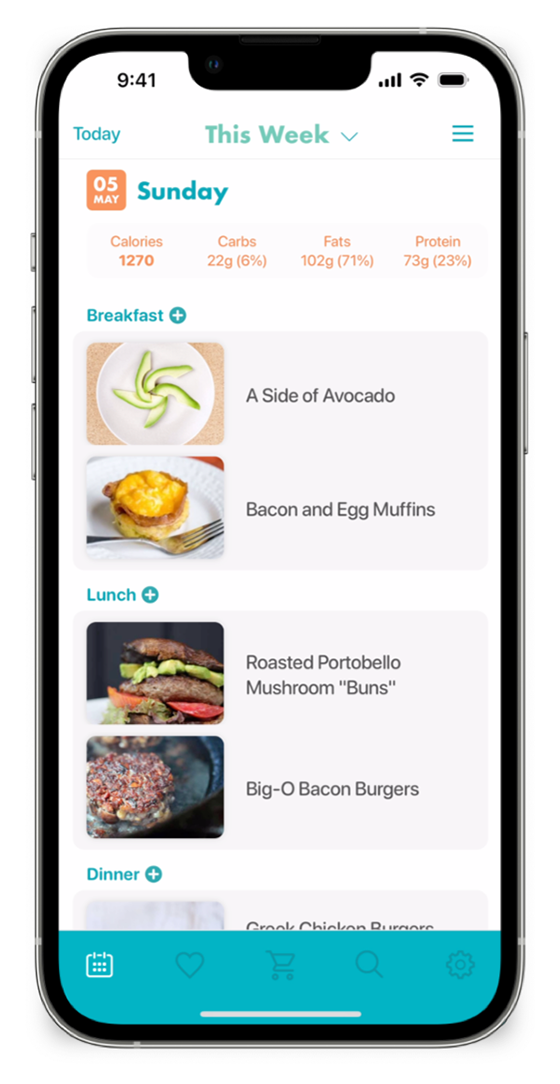
Choose daily goals for calories, protein, carbohydrates, and fat.
Update portions and add snacks to reflect your day.
Review daily totals and color-coded progress alongside your plan.
Make room for real life
Keep tracking connected to the meals you plan, shop for, and cook. Your meal plan, organized shopping list and preparation reminders help you get food on the table; Macro Tracker records what and how much you eat alongside that plan.
Whether you want to understand your food better, follow a keto meal plan, or work toward weight or muscle-building goals, you can review your daily totals against the targets you set.
Build your week around your food preferences.
Turn the ingredients in your plan into an organized list.
Follow your recipes and update the portions you eat.

From goals to daily totals
See calories, carbohydrate, fat and protein together, then update your log to reflect what you actually ate.
Step 1
On the Real Plans website, choose Planner, open the dropdown on the right and select Macro Tracker. Use the arrows to move between days. Choose Switch to Percentages to view percentages instead of grams.
Step 2
Open Goals to enter calorie and macronutrient targets manually or use the Real Plans Macro Calculator. The calculator uses details including gender, current weight, height, age and activity level to suggest a breakdown for your selected goal.
Step 3
Open a planned recipe to adjust servings, units or macro amounts, then choose Update. Remove a meal you did not eat. Add unplanned snacks, ingredients or recipes with the quantity and meal they belong to, so your totals reflect your day.
Step 4
Open Summary to review your Weekly Summary against your Daily Goals. Green values mean you were below or met the goal; red values mean the goal was exceeded. Use the summary to understand the pattern of your week.
Macro Tracker add-on
These prices are for Macro Tracker only. A Real Plans subscription is required and purchased separately.
$27/year
Billed as $27/year
$12/quarter
Billed as $12 every 3 months
$5/month
Billed as $5/month
All prices are in USD. Subscriptions renew until cancelled. Web purchases include a 10-day money-back guarantee.
Need meal planning too? Explore Real Plans subscriptions

Food is about more than nutrition numbers. Tracking is optional; a healthy relationship with food matters more than counting every calorie. If seeing numbers makes eating feel stressful or leads to obsessive counting, you can choose to plan meals without tracking.
You may use tracking for a while, become more familiar with your portions and food, then decide you no longer need daily totals. To temporarily disable Macro Tracker functions, open Settings, choose My Meal Plan, then Advanced Settings.
Disabling the functions does not cancel your Macro Tracker subscription. For help cancelling the add-on or changing your subscription, contact support@realplans.com.
Read more about food and macro trackingI’ve tried so many meal plans and none of them worked for me, but yours does!! Fresh, delicious, simple! KEEP UP THE GREAT WORK!!!!
— Rebecca, Mom to 4 hungry kids
Most importantly this service is helping me take better care of myself. At the end of the day, thats what matters. I’ve already converted my quarterly membership to an annual plan.
— Patrice, KS
I also want to say that I am loving this meal plan program so far and the meals are so delicious, it’s been far too long since I’ve eaten food that is this good for me and tastes this amazing.
— Christina, ME
I tried one other meal planning service that just was very cumbersome and time consuming. Real Plans, however, was a breeze to learn to use. The instructional videos were very helpful.
— Darla, KY
Love the service, friendliness and cheer of the whole service team! There is such a friendly “vibe”! love the service too!! Thanks!!
— Heather, TX
It feels almost like you read my mind and created a program to match. Thank you!!!
— Sarah, NM
Finally sitting down to really dig in to the software – LOVING it!! I love that I can just import a link to a recipe and it maps to all of the right fields!
— Steph, PA